This is our own documentation, not an independent review. We have put the limitations in as much detail as the features, because you will find them out anyway and it is better you know first. Prices and requirements are the ones live on the App Store on 21 July 2026.
Short answer
Mornio is an iPhone alarm app for people who turn the alarm off and fall back asleep.
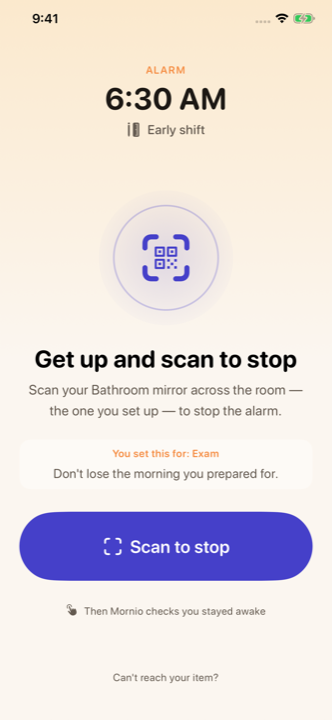
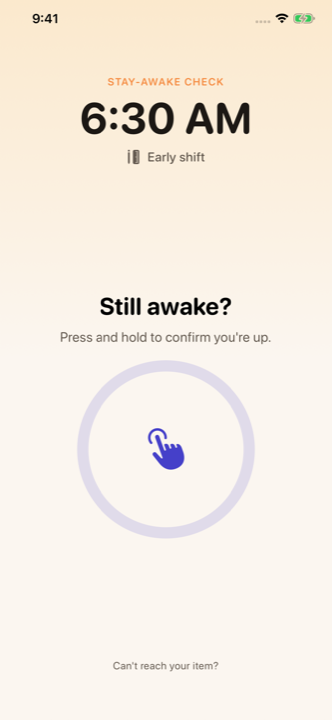
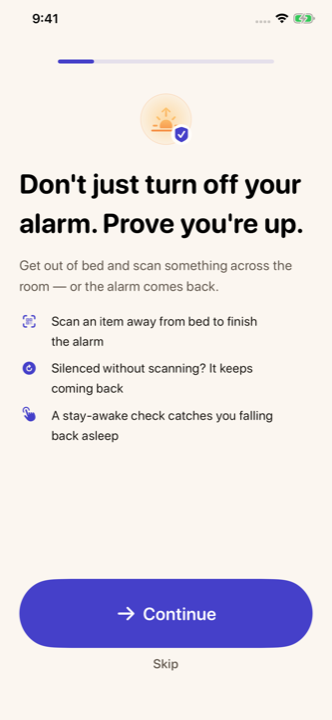
You dismiss it by scanning a QR code or barcode you registered in advance, which lives across the room, so stopping the alarm requires getting out of bed. A few minutes later a stay-awake check confirms you are still up, and if you do not respond, the alarm restarts. There is no account, no ads and nothing declared under Data Used to Track You. It requires iOS 26.1 and runs on iPhone only.
The short version
Scan, then a check. That is the whole idea. Scan to stop. Then it checks you stayed up. Three completed wake-ups are free, then Pro.
Mornio exists because of one specific failure: the alarm rings, you deal with it, and you wake up an hour later with no memory of having dealt with it. Almost every alarm treats dismissal as success. Mornio treats it as the moment of maximum risk.
The one-paragraph version
Mornio is made by an independent developer and published on the App Store as an iPhone alarm app. Its two distinguishing features are the Wake Check, a scan of a specific code you registered, and the stay-awake check, a follow-up prompt a few minutes after dismissal that restarts protection if ignored. Everything stays on your iPhone: no sign-up, no Mornio account, no Mornio server.
The facts, in a table
Mornio at a glance, as of 21 July 2026.
What it is
An iPhone alarm app with a scan-to-dismiss mission and a follow-up check
Platform
iPhone only. No iPad, Apple Watch, Mac or Android version
Minimum iOS
iOS 26.1 or later
Price
3 free wake-ups, then Mornio Pro $7.99/month or $29.99/year
Free trial
3 free wake-ups with full Pro features, no card required
Account
None. No email, no password, no sign-up
Ads
None
Data used to track you
None declared
Where data lives
On your iPhone, in the app's private storage
How a Mornio morning goes
The alarm rings. It is a real system alarm scheduled through Apple's AlarmKit, so it sounds through Silent mode, through Focus modes and on a locked screen.
You pass the Wake Check. The alarm keeps going until you scan the exact QR code or barcode you registered. A different code will not work, so you cannot keep a decoy by the bed.
Mornio checks again. After a delay you choose (2, 3, 5 or 10 minutes, or off), the stay-awake check asks you to confirm you are still up.
If you do not respond, protection restarts and the alarm comes back.
There is also a backup alarm four minutes after the primary, which cancels itself once you have proved you are up, and an emergency dismissal that always works and is recorded honestly in your history.
Who Mornio is not for
This is the part most product pages leave out, so here it is early.
Anyone whose iPhone cannot run iOS 26.1. There is no older-iOS version and there will not be one. Alarmy (iOS 17) or Nuj (iOS 15) will reach you where we cannot.
Anyone wanting sleep tracking. Mornio does not track sleep, detect snoring or offer sleep sounds. Sleep Cycle is the specialist.
Anyone wanting the widest mission variety. There are five missions (Scan, Walk, Shake, Math and Type), with the scan as the default. No photo, memory or squat mission. Alarmy has by far the widest set.
Anyone motivated by gamification. Mornio only counts a streak of mornings, with no points, levels or achievements. Erly is built around that.
Anyone who wants a huge sound library. Mornio has 14 sounds plus a sound file of your own; Apple’s Clock and Alarmy offer more.
Anyone who needs cloud backup. No account means no sync and no backup. Lose the phone, lose the history.
What Mornio does not claim
Mornio reduces the risk of oversleeping. It cannot guarantee you will wake up, and we do not say otherwise anywhere. It is not a medical device, it does not diagnose or treat anything, and it will not compensate for chronic sleep deprivation. For a morning you genuinely cannot miss, we recommend a second independent alarm on another device, which is advice against our own commercial interest and still the right advice.
Mornio is an iPhone alarm app for people who dismiss their alarm and fall back asleep. You turn the alarm off by scanning a QR code or barcode you registered in advance, which lives across the room, and a few minutes later a stay-awake check confirms you are still up. If you do not respond, the alarm restarts. It requires iOS 26.1, has no account and shows no ads.
Who makes Mornio?
Mornio is made by an independent developer and published on the App Store. There is no parent company, no venture funding and no advertising business behind it. The app is supported by the Mornio Pro subscription, which is the only thing it asks of you.
Is Mornio available on Android?
No, and it is not planned. Mornio's alarm is built on Apple's AlarmKit, an iOS-only framework that lets a third-party app schedule a real system alarm which sounds through Silent mode and Focus. There is no equivalent path on Android, so an Android version would be a different and weaker product.
What makes Mornio different from other alarm apps?
Two things. The follow-up stay-awake check is the core of the product rather than a premium extra, so failing it restarts the alarm. And there is no account at all, with nothing declared under Data Used to Track You. Several competitors offer a similar check, notably Alarmy as a premium feature and Nuj via a get-up deadline, so the combination rather than any single feature is the difference.
Does Mornio guarantee I will wake up?
No, and be sceptical of any alarm app that claims to. Mornio is designed to reduce the risk of oversleeping by making dismissal require leaving your bed and by checking again afterwards. It cannot override severe sleep deprivation or an underlying sleep disorder. For a genuinely critical morning, set an independent backup alarm on another device as well.
Mornio Privacy Policy, on what is stored on your iPhone and what is not stored at all.
Mornio Terms of Use, including the alarm and device limitations and the no-guarantee disclaimers.
Apple, AlarmKit framework documentation, and Apple’s WWDC25 session “Wake up to the AlarmKit API”, on the iOS 26 framework that lets third-party alarms sound through Silent mode and Focus.
App Store details change without notice. Everything above was checked on 21 July 2026 — if you spot something out of date, tell us at support@mornioapp.com and we’ll correct it. Written and published by the Mornio team. Last reviewed 21 July 2026.