
14 alarm sounds, or your own.
From a gentle sunrise to a siren, or the iPhone alarm tone. Add a sound file of your own and it loops until you stop it.
iPhone alarm for heavy sleepers
For when you turn off your alarm in your sleep and wake up late with no memory of it.
To stop Mornio, get up and scan a code you saved away from bed. Skip the scan and it rings again.
Then Pro: US $29.99/year
or US $7.99/month · See plans
iPhone · iOS 26.1+
No account. No ads. Trying it won’t start a subscription.
Scan-code privacy
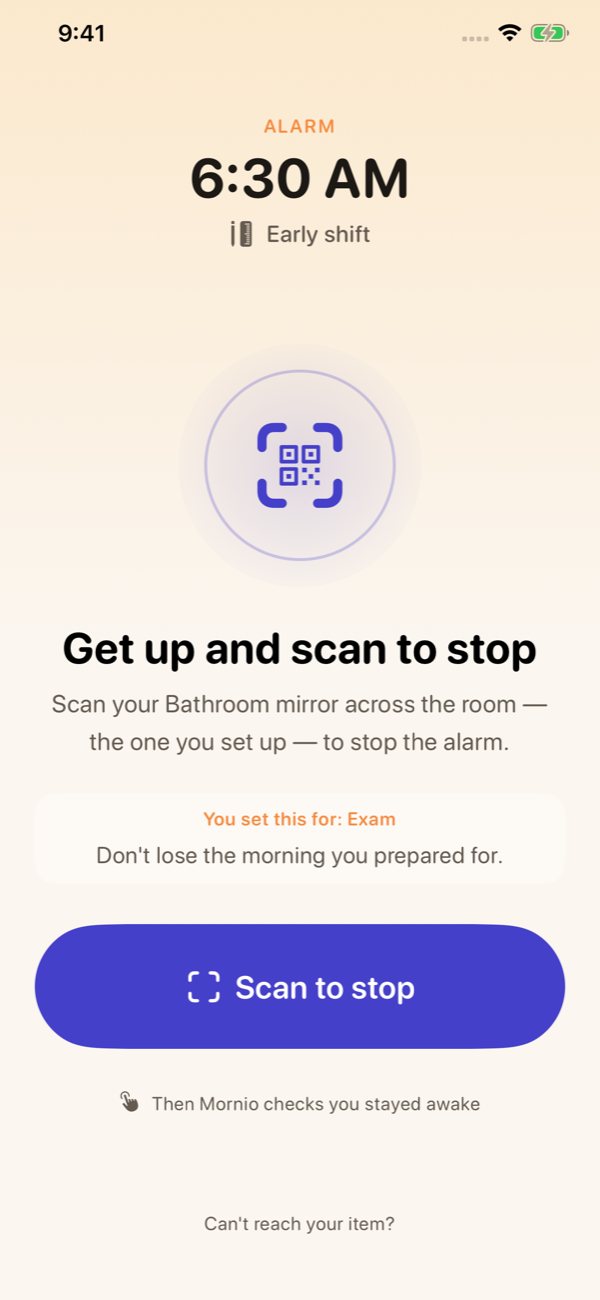
Your saved code.
Not a sleepy tap.
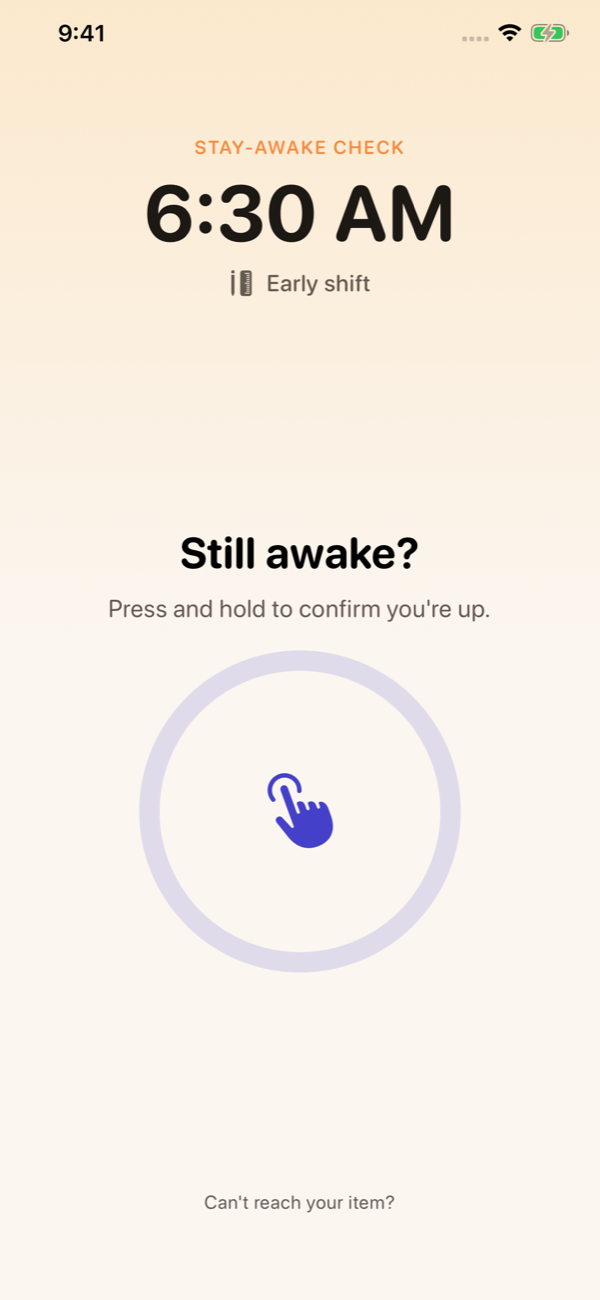
A follow-up check.
Because you might
lie back down.
App screen shown. Walkthrough is illustrative; no sound needed.
Sound familiar?
Three alarms, ten minutes apart. You turn off all three.
You walk over, switch it off and get back into bed.
You’re up. Ten minutes later, you’re asleep again.
Then you look at the time.
“I’m a heavy sleeper. Not ‘hit snooze once’ heavy. I would turn off three stacked alarms in my sleep and wake up an hour late with zero memory of doing it. The problem was never hearing the alarm. It was that turning it off had become a reflex I could do half-asleep, from bed, without ever really waking up. So I built Mornio.”
 Praveen KumarMaker of Mornio
Turning an alarm off takes almost no wakefulness. For a while after you wake, the part of you that can reach for a phone is back before the part that makes decisions and remembers them. That groggy stretch has a name: sleep inertia.
A louder sound or another alarm still ends in the same sleepy tap. Mornio moves the off switch away from the bed.
Why you turn alarms off without rememberingThe part a sleepy tap skips
Walk to the QR code or barcode you saved and scan it. Silence the alarm without scanning and it comes back.
With the stay-awake check on, Mornio asks again 2 to 10 minutes later. Press and hold to confirm you’re up.
No answer? The alarm restarts. A backup alarm a few minutes after the first adds another layer.
Back in bed?
This is the next step.
Your wake-up mission
Pick a mission for each alarm. Whichever you choose, stop the alarm before the mission is done and it rings again.
Walk to a barcode or QR code you saved and scan it.
Walk a set number of steps, counted by your iPhone.
Shake your phone a set number of times.
Solve a few quick sums.
Type a short phrase exactly.
Only Scan needs you to reach something away from the bed. Shake, Math and Type can be done lying down, so turn on the stay-awake check if you pick one of them.
From a gentle sunrise to a siren, or the iPhone alarm tone. Add a sound file of your own and it loops until you stop it.
Every morning you finish your mission counts. Days without an alarm don’t break it, so a weekend off is fine.
In the evening, Mornio checks what your next alarm needs, like alarm access and your scan item, with one button to fix anything missing.
Tonight, before bed
The code is not the point. The walk to it is. Try the bathroom or kitchen, somewhere you can safely reach.
Scan once during setup. Choose your alarm time. No account or special hardware needed.
Allow alarm and camera access. Check your settings with the 30-second test before your first night.
A way out when you need it. Tap “Can’t finish?” and the backup mission you chose (Math, Type or Shake) starts. A backup scan item works too. Last resort: a 15-second emergency hold.
Your routine stays yours. Alarms and saved scan codes stay on your iPhone. No account and no ads. How your alarm data is stored.
Before you download
Try it on real mornings
Every wake-up idea sounds workable at two in the afternoon. Try Mornio on three mornings you actually have to get up for.
Your first three completed wake-ups are free, with every mission, sound and check included. Using them doesn’t start a subscription. After that, Mornio Pro is required to activate further alarms.
Included in your free wake-ups, and in Pro
| Limit | Free | Pro |
|---|---|---|
| Completed wake-ups | 3 | Unlimited |
| Active alarms | 1 at a time | Unlimited |
No account needed. Using the free wake-ups doesn’t start a subscription.
Try 3 wake-ups freeon the App StoreIf it changes how you get up, keep it
Pro keeps Mornio working after your free wake-ups.
$29.99/yearabout $2.50 a month, or $7.99 monthly
New to Pro? The yearly plan starts with a 7‑day free trial if your Apple Account is eligible. The app shows it before you confirm.
US App Store prices. Local pricing is shown in the app before purchase. Subscriptions renew automatically unless canceled in your Apple Account settings.
Silencing the system alarm before your mission is done brings the alarm back. Finish the mission (scan your saved code, or the Shake, Math, Type or Walk mission you picked) to complete that step. The optional stay-awake check follows up afterward. Emergency dismissal remains available when you genuinely cannot finish.
Tap “Can’t finish?” on the alarm screen. If you set a backup mission (Math, Type or Shake), it starts straight away. You can also save a backup item in another place; scanning either code stops the alarm. If nothing works, hold the emergency button for 15 seconds. It is recorded in your alarm history. Pick a code you can reach safely and keep it where you expect to find it.
With alarm permission enabled, Mornio’s primary alarm uses Apple’s system alarm and can sound in Silent mode and Focus. Choose one of 14 Mornio sounds, the iPhone alarm tone or a sound file of your own. Keep your phone powered on, check your settings, and run the built-in real-alarm test. No alarm app can guarantee that you will wake up.
Start with Scan if you fall back asleep after turning alarms off. It is the only mission that needs you to reach something away from the bed. Walk gets you moving, and the other three wake your brain without getting you up, so pair them with the stay-awake check. No mission can prove you are awake; each one asks for a little effort before the alarm stops.
No. The three included wake-ups are not an automatically renewing subscription trial. You choose whether to purchase Mornio Pro in the app. After those wake-ups, Pro is required to continue. If you subscribe, Apple handles payment and renewal; you can manage or cancel it in your Apple Account settings. The 7-day free trial on the yearly plan is different: it starts a subscription that renews unless you cancel before the trial ends.
For tomorrow morning
Tonight, save a code in the bathroom or kitchen, set your time and ring the test alarm. Then see what a morning looks like when turning the alarm off isn’t something you can do in your sleep.
Try 3 wake-ups freeon the App Store
iPhone · iOS 26.1+ · No subscription starts from trying it.
Then Pro: US $29.99/year or $7.99/month. Local prices shown in app.

Reading on your computer?
Scan with your
iPhone camera.