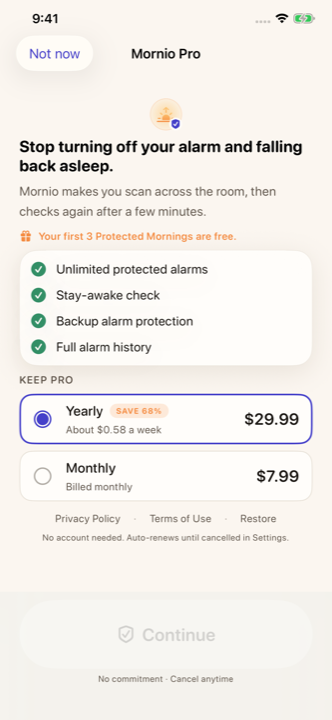
“Free” on the App Store means free to download, which tells you almost nothing. Here is exactly where our line sits, with no vagueness, so you can decide before installing rather than after a setup flow.
What the three free wake-ups include
Everything. There is no cut-down free version to evaluate: for your first three completed wake-ups you are running the whole app.
- The Wake Check. The full scan-to-dismiss mission with a QR code or barcode you register.
- The stay-awake check and automatic restart. The follow-up after you dismiss the alarm, and the restart if you ignore it.
- Backup alarm protection. A second alarm four minutes after the first.
- Repeat schedules and your full alarm history.
- A real system alarm through AlarmKit, ringing through Silent mode and Focus.
- Emergency dismissal, never paywalled, and recorded in your history.
- No ads, no account, no card. There are no ads anywhere in Mornio, on any tier.
One alarm armed at a time. That is what makes three wake-ups mean three: the armed alarm is always the one spending a credit, and a wake-up is only spent when a morning completes.
What happens after the third
Mornio can no longer arm a wake-up. Setting a new one, or switching a disabled one back on, needs Pro.
An alarm you already armed is never cancelled. If your last wake-up is spent while tomorrow’s alarm is already set, it still rings and still completes. Taking away an alarm somebody set for the morning is not something we are willing to do.
Without Pro after that, the app keeps your 7 most recent history entries and shows the status “Alarm ready” rather than “Protected”, because the follow-up layers are not active.
This is a change worth stating plainly: the free tier used to keep working forever as a single manual alarm, and it does not any more. Everyone on the old tier was given three fresh wake-ups when the rule changed, so nobody woke up to a dead alarm.
What Mornio Pro is for
- Wake-ups that keep going after the third.
- More than one alarm armed at a time.
- Full alarm history, beyond the 7 most recent entries.
Pro is $7.99 per month or $29.99 per year on the US App Store. Prices vary by region, and the price shown in the app before you buy is the one that applies.
Free, spent and Pro, side by side
| First 3 wake-ups | After them, free | Pro | |
|---|---|---|---|
| Arm a new wake-up | Yes | No | Yes |
| Alarms armed at once | 1 | None new | Unlimited |
| QR / barcode Wake Check | Yes | Needs Pro | Yes |
| Stay-awake check and restart | Yes | Needs Pro | Yes |
| Backup alarm | Yes | Needs Pro | Yes |
| Repeat schedules | Yes | Needs Pro | Yes |
| An alarm already armed still rings | Yes | Yes | Yes |
| Alarm history | Full | 7 most recent | Full |
| Emergency dismissal | Yes | Yes | Yes |
| Ads | None | None | None |
| Account required | No | No | No |
Things we do not do
- No card for the free wake-ups. They need no payment details, so nothing can auto-convert.
- No onboarding wall. You are not asked a page of questions before finding out there is a price.
- No ads, on any tier.
- No account, free or paid. Purchases attach to your Apple Account, which is how restoring works on a new phone.
For context on how that compares, our guide to alarm apps you can actually use without paying looks at where every app in this category draws the line, including one whose listing states a subscription is required to set alarms at all.
Is three wake-ups enough to judge it?
It is enough for the only question that matters: does this get you out of bed, and keep you out? Spend them on three mornings you actually have to get up for, not on an afternoon test. If the stay-awake check catches you going back to bed, you know exactly what you would be paying for.
If it never fires because you were already up and moving, that is an answer too, and a cheaper one. You may not need this.