We make an alarm app, and this page is written to be useful even if you never install it. The free fixes come first, because for most people they are enough. Anything about sleep itself is sourced to published research or the NHS rather than to us, and linked at the bottom. Mornio is not a medical product and cannot diagnose or treat anything.
Short answer
A backup alarm is a second alarm scheduled shortly after the primary, as insurance if the first one fails or is dismissed without you really waking.
The version that works cancels itself once you have proved you are up. The version most people set manually does not, so it becomes another alarm to dismiss, and dismissing alarms is the habit you are trying to break.
The layer under the first alarm
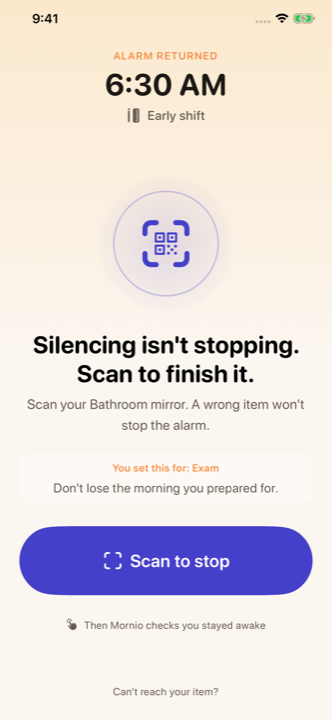
A backup only helps if the first alarm was hard to end. Scan to stop. Then it checks you stayed up. Three completed wake-ups are free, then Pro.
Nearly everyone who oversleeps has tried backup alarms, usually by stacking four of them. It rarely helps, and understanding why explains what a good backup actually looks like.
Why a stack of alarms fails
Every alarm you dismiss without getting up rehearses the exact reflex you want to break. Four alarms is four repetitions a morning until the routine is fully automatic. Worse, knowing a later alarm exists makes the earlier ones informational rather than actionable, so the first alarm, the one with the best chance of catching you in lighter sleep, is the one you have trained yourself to ignore.
Redundancy only helps when the copies fail differently. Four alarms on one nightstand fail identically.
What good backup protection does differently
It is automatic, so you are not consciously budgeting for failure when you set it.
It is short, a few minutes rather than half an hour. Long enough to catch a genuine failure, short enough that you cannot get back to sleep in the gap.
It cancels once you prove you are up. This is the crucial part. A backup that always fires becomes noise you learn to dismiss.
It does not replace the primary. The main alarm still has to be hard to defeat.
In Mornio the backup fires four minutes after the primary, and on a one-time alarm it cancels as soon as you pass the Wake Check. So it only ever rings if something went wrong.
One honest limitation: on repeating alarms Mornio leaves the backup scheduled, because cancelling it would remove all future occurrences. So a repeating alarm's backup can still ring after you are up. That is a known trade-off rather than an accident, and it is documented in our troubleshooting page.
Backup alarm versus stay-awake check
They cover different failures and people often confuse them.
Backup alarm
Stay-awake check
Covers
The alarm failing, or being dismissed without waking
You waking, dismissing, then relapsing
Fires
A few minutes after the primary, regardless
A few minutes after you dismiss it
Cancelled by
Proving you are up
Responding to the prompt
Failure it catches
You never really got up
You got up and went back
Most people need the second one more than the first, but they work well together. More on the follow-up in what is a stay-awake check.
The best backup is a different device
For anything that genuinely cannot be missed, no in-app backup beats this: a second alarm on a different device with a different power source. A cheap mains-powered clock defeats a flat phone battery, which is the single most common cause of a missed alarm, and no software feature can.
This is what people catching 5am flights actually do. It is not paranoia, it is redundancy across a different failure mode, which is the only kind that helps.
How to set one properly
One backup, not four.
A few minutes after the primary, not half an hour.
In a different room if it is a manual one, so it cannot be silenced from bed.
On a different device for anything critical.
Do not tell yourself the primary is optional. That is the mindset that makes backups counterproductive.
Mornio on iPhone. Screenshots from the current App Store listing.
A backup that cancels once you're up
Four minutes after the primary, cancelled as soon as you pass the Wake Check.
A second alarm scheduled shortly after the primary, as insurance in case the first fails or is dismissed without you properly waking. A good implementation is automatic, short, and cancels itself once you have proved you are up, so it only rings when something has actually gone wrong.
Is a backup alarm the same as a stay-awake check?
No. A backup alarm covers the case where the first alarm failed or you never really got up, and it fires a few minutes after the primary. A stay-awake check covers the case where you did get up, dismissed the alarm and then went back to bed, and it fires a few minutes after dismissal. Most people need the second one more.
How many backup alarms should I set?
One, or none if your primary is genuinely hard to dismiss. Stacking several teaches you that the first alarm is optional, and every alarm you switch off from bed rehearses the reflex you are trying to break. For a morning that cannot be missed, add one backup on a different device with a separate power source rather than more alarms on the same phone.
Why does my backup alarm still ring after I get up?
In Mornio, one-time alarms cancel the backup as soon as you pass the Wake Check. Repeating alarms do not, because cancelling would remove all future occurrences, so a repeating alarm's backup can still ring once you are up. If you set backups manually in the Clock app, they will always ring unless you delete them.
Alarmy - Loud Alarm Clock, Delight Room Co., Ltd. App Store listing (price, ratings, compatibility, mission list and App Privacy labels).
Custom snooze duration (1–15 minutes) in the iOS 26 Clock app, as reported by MacRumors and 9to5Mac.
App Store details change without notice. Everything above was checked on 21 July 2026 — if you spot something out of date, tell us at support@mornioapp.com and we’ll correct it. Written and published by the Mornio team. Last reviewed 21 July 2026.